



If you want to set up a WooCommerce online store, understanding the costs involved is essential for successful budgeting and planning. As of 2025, you have two main paths: the classic self-hosted platform or an all-in-one hosted solution, like the WordPress.com Commerce plan. This guide will focus on the self-hosted WooCommerce costs, as this path gives you the maximum flexibility and customization for your store.
This article is designed to guide you through the various expenses associated with WooCommerce, ensuring you make informed decisions about your eCommerce venture.
Understanding the cost of a WooCommerce store
A WooCommerce store’s costs are split into two main categories: development and platform expenses. Development costs cover the professional services for building, customizing, and maintaining your online store. Platform costs include all the required technical pieces, like hosting, domains, themes, plugins, and other third-party services.
WooCommerce itself is free. Anyone with a WordPress site can download and install WooCommerce. This accessibility is a significant factor why many choose this platform as a solution for their online business site.
Beyond that, your total investment is a strategic choice. The final cost depends on your store’s complexity, your customization needs, and whether you handle the work yourself or hire professionals.
What you get out of the box with WooCommerce
The free WooCommerce plugin is a robust platform equipped with all the essential features needed to run an online store.
By default, it includes:
- Product management: You can easily add, edit, and categorize products. The system streamlines setting prices, managing stock levels, and configuring shipping options.
- Shopping cart and checkout: WooCommerce provides an efficient cart and a secure checkout process, ensuring customers have a smooth journey from browsing to buying. Customers can also create accounts or check out as guests.
- Payment gateway integration: The platform integrates with popular payment methods like WooPayments, PayPal, Stripe, credit cards, direct bank transfer, and cash on delivery.
- Does WooCommerce take a cut of your sales? No. The WooCommerce plugin itself is free and does not charge you a platform fee per transaction. However, the payment gateway you choose will charge its own processing fees, typically from 2.9% to 6% per transaction.
- Order management: You get a streamlined system to track sales, efficiently process orders, and communicate purchase statuses to customers.
- Basic analytics: Built-in reporting tools provide valuable insights into sales trends and customer behavior, allowing for informed, data-driven decisions.
- Optimized site structure: As a WordPress plugin, WooCommerce inherits an organized architecture. This includes clean URLs, logical site navigation, and the use of categories and tags.
Understanding WooCommerce development costs
Your most significant investment will likely be professional help. WooCommerce development costs cover all professional services for building, customizing, and maintaining your store, from small feature additions to complete custom builds.
This is separate from your platform costs (like hosting and plugins). Professional development budgets can range from $1,500 for a basic setup to over $45,000 for a complex, enterprise-scale store.
Project cost tiers
To give you a clearer picture, here is what you can generally expect to pay for different levels of development.
Basic store development: $1,500–$5,000
A basic WooCommerce development project costs between $1,500 and $5,000. This budget is for a standard store setup with minimal customization. The scope typically includes a simple product catalog, a standard checkout process, basic theme customization, and configuration of essential plugins. This tier is suitable for straightforward implementations.
Good for: Stores with under 50 products, standard checkout flows, and minimal third-party integrations.
Mid-level store development: $5,000–$10,000
Mid-level WooCommerce projects cost from $5,000 to $10,000 and include moderate customization and feature additions. This scope can cover custom product displays, checkout modifications, API integrations, and moderate plugin customization. It’s designed for stores with multiple product variations, custom shipping rules, or specific payment gateway integrations.
Good for: Growing stores with 50-200 products, custom workflows, and third-party tool integrations.
Enterprise/complex store development: $10,000–$45,000+
The cost of developing complex WooCommerce stores ranges from $10,000 to over $45,000 for extensive custom development. This budget is for custom plugin development, advanced integrations (like with an ERP or CRM), multi-location inventory, and complex pricing rules. Enterprise-level implementations that require specialized, unique functionality can easily reach $45,000.
Good for: High-volume stores, B2B functionality, custom marketplace features, and multi-vendor platforms.
💡 Budget planning tip: Most store owners underestimate development costs by focusing only on platform expenses. Factor professional development into your total budget from the start to avoid project delays.
Developer hourly rates
If you hire a developer for smaller tasks instead of a full project, you’ll likely pay by the hour. WooCommerce developer hourly rates vary widely based on experience level, specialization, and geographic location.
Entry-level developers: $50–$100/hour
Entry-level WooCommerce developers charge $50 to $100 per hour for basic development work. This rate is best for straightforward customizations, plugin installations, and simple theme modifications.
Good for: Basic customizations, plugin setup, and minor bug fixes.
Experienced/specialized developers:
$100–$200+/hour Experienced WooCommerce developers charge $100 to $200 or more per hour for specialized work. They are hired to handle complex integrations, custom plugin development, performance optimization, and security implementations.
Good for: Custom features, API integrations, performance optimization, and security implementations.
Custom plugin and theme development
Sometimes, an off-the-shelf plugin or theme just won’t do the job. When you need truly unique functionality, you’ll be looking at custom development, which has its own pricing.
- Custom plugin development: Custom WooCommerce plugin development can cost anywhere between $400 and $30,000, depending on the complexity. A simple plugin that adds one specific feature might start around $500. However, a comprehensive plugin with multiple API connections, database optimization, and its own admin interface can easily cost $8,000.
- Custom theme development: Similarly, custom WooCommerce theme development costs can range from $1,000 to $10,000. This service is for creating a completely unique, branded design with custom layouts that requires significant developer expertise. It’s essential to note that this differs from simply purchasing a pre-built premium theme (which we’ll cover later in the optional costs section).
Monthly maintenance and retainer costs
Development isn’t just a one-time cost. Your store is a living asset that needs regular care to stay secure, fast, and functional. Monthly WooCommerce maintenance retainers range from $500 to $3,000, based on the support level and your store’s complexity.
Here’s a typical breakdown of what you get at each level:
- Basic maintenance: $500–$1,000/month
- This level typically costs between $500 and $1,000 per month for essential updates and monitoring. It covers plugin updates, security patches, backup verification, and basic troubleshooting.
- Good for: Small stores with straightforward configurations and minimal custom code.
- Standard maintenance: $1,000–$2,000/month
- Standard packages often cost $1,000 to $2,000 per month for more comprehensive support. This often includes priority support, performance monitoring, monthly reports, and minor feature updates.
- Good for: Growing stores with moderate traffic and regular feature requests.
- Premium maintenance: $2,000–$3,000+/month
- Premium retainers may need to invest $2,000 to $3,000 or more in dedicated, proactive technical support. This provides immediate troubleshooting, strategic consulting, and rapid feature development for mission-critical operations.
- Good for: High-volume stores, enterprise implementations, and mission-critical eCommerce operations.
This ongoing investment is crucial for business continuity. Professional maintenance prevents expensive downtime by catching security issues or plugin conflicts before they can impact your sales.
Factors that influence development costs
Several factors determine final WooCommerce development costs beyond the base project pricing. Keep these variables in mind as you plan your budget:
- Project complexity: More custom features, integrations, and specialized functionality increase development costs significantly.
- Developer experience and location: Rates are higher for senior developers and those in North America or Western Europe.
- Custom features and integrations: Connecting your store to CRMs, ERPs, or custom APIs adds to development expenses.
- Store scale and traffic: High-traffic stores require performance optimization and scalable architecture, which increases development time.
- Timeline urgency: Rushed projects with tight deadlines typically cost twice as much as standard timelines.
Existing technical debt: Stores with poorly coded customizations require cleanup work before new development can begin safely.
Small customization projects
What if you don’t need a full build, but just some specific help? Small WooCommerce customization projects can cost between $200 and $12,000, depending on the specific feature or modification.
Here are a few practical examples:
- Single plugin installation and configuration: This covers installing a premium plugin, configuring its settings, and testing its compatibility with your existing theme and plugins.
- Basic theme modifications: This includes adjusting layouts, colors, and styling within your existing theme’s framework. It does not include complete custom theme development from scratch.
- Simple checkout customization: This could cover adding custom fields, adjusting checkout steps, or modifying the order confirmation page. More complex multi-step checkout rebuilds would cost more.
As a baseline, you can budget $1,500 to $3,000 for a basic store setup with these kinds of minimal customizations, assuming you are handling all the content and product entry yourself.
Preparing for accurate development quotes
To receive accurate cost estimates, you must prepare specific project details before contacting WooCommerce developers. The more prepared you are, the better a developer can scope your project and prevent future “scope creep.”
Here is a checklist to follow:
- Define functional requirements: List specific features you need, like subscription billing, membership access, or custom product configurators.
- Document current technical setup: Note your existing plugins, theme, hosting environment, and any custom code already in place.
- Identify required integrations: Specify third-party services that need connection, like CRMs, accounting software, or shipping carriers.
- Establish timeline constraints: Clarify your launch date, seasonal deadlines, or any other time-sensitive factors.
- Determine budget parameters: Set your budget range to help developers propose solutions that realistically match your financial constraints.
- Provide site access if applicable: Grant staging site access for developers to accurately assess your existing technical implementation.
- Gather design references: Collect competitor examples, wireframes, or brand guidelines that show your desired look and feel.
- Outline success criteria: Define how you’ll measure success, such as conversion rates, page load speed, or specific functionality.
| 📋 To-do checklist before contacting developers: 1. Finalize the product count and types you’ll sell. 2. Decide the custom features needed beyond standard WooCommerce. 3. Confirm third-party integrations required (CRM, accounting, etc.). 4. Fix your project timeline and launch date. 5. Define a budget range for development work. 6. Check competitor or reference examples. |
💡 Pro Tip: Share competitor store examples when requesting quotes. This helps developers understand your vision and provide accurate estimates.
Platforms like Codeable provide free project scoping consultations to help you refine these requirements before developers even submit estimates. This preparation ensures you get accurate pricing and prevents misunderstandings during development.
Total WooCommerce costs by store size
Here’s a quick-glance table that combines potential development costs with annual platform costs to help you budget for your first year:
| Cost Category | Small Store | Mid-Size Store | Large Store |
| 💻 Development | $1.5K-5K | $5K-10K | $10K-45K+ |
| ☁️ Hosting | $36-180/year | $240-1.2K/year | $1.2K-6K+/year |
| 🌐 Domain | $10-20/year | $10-20/year | $10-200/year |
| 🎨 Theme | $0-200 | $50-500 | $200-2K+ |
| 🧩 Plugins | $0-500/year | $500-2K/year | $2K-5K+/year |
| 🔒 Security | $0-200/year | $200-500/year | $500-1K+/year |
| 🛠️ Maintenance | $0-6K/year | $6K-12K/year | $12K-36K+/year |
| 💰 TOTAL (Year 1) | $2K-7K | $6K-13K | $17K-72K+ |
Note: This table excludes payment processing fees (e.g., 2.9% + $0.30 per transaction).
Use this to:
- Identify your store size category.
- Set realistic budget expectations.
- Prioritize essential vs. optional expenses.
Breaking down mandatory expenses
Since your WooCommerce store will be built on a WordPress site, there are a few mandatory costs linked to this foundation:
Hosting
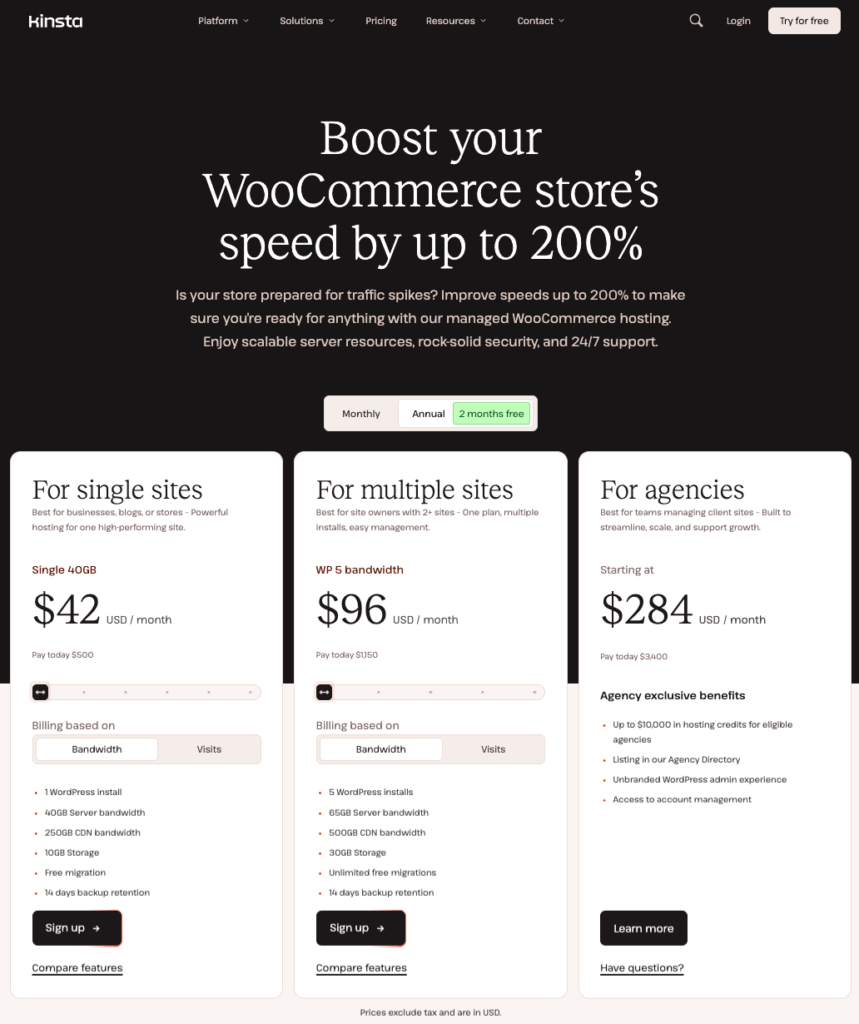
WooCommerce hosting costs range from $3 to $25 per month for shared hosting, up to $200 or more per month for managed or dedicated servers. Your hosting choice significantly impacts store performance, security, and scalability as your business grows. Think of hosting as the virtual home of your online store; its reliability and speed directly affect your customers’ experience.
Hosting cost tiers
Shared hosting: $3–$15/month
Shared hosting costs $3 to $15 monthly and works for new stores with under 50 products and low traffic. Be aware that shared resources can cause slow performance during traffic spikes.
Good for: Brand new stores testing product-market fit with minimal initial investment.
Managed WooCommerce hosting: $40–$300/month
Managed WooCommerce hosting costs $40 to $300 monthly and provides optimized performance with automatic updates. This typically includes server optimization, automatic backups, security monitoring, and WooCommerce-specific support. We highly recommend using Kinsta or WP Engine as your web hosting provider.
Good for: Growing stores with 50-500 products and steady traffic.
VPS/Dedicated hosting: $100–$500+/month
VPS or dedicated hosting costs $100 to $500 or more monthly for high-traffic stores that require dedicated resources. This is necessary for stores that process hundreds of orders daily or handle major traffic spikes.
Good for: Established stores with 500+ products, high traffic, and peak season demands.
With the introduction of WooCommerce’s High-Performance Order Storage (HPOS), stores can handle significantly more orders using the same hosting resources. This performance improvement can delay the need for costly server upgrades as your store scales.
Domain registration
The domain is your store’s address on the internet, and it’s a yearly expense. While some domains are quite affordable, premium domain names – those that are short, memorable, or highly relevant to your business – can cost significantly more. Our advice is, instead of focusing exclusively on the price, take your time to choose a name that resonates with your brand and is within your budget.
Security
WooCommerce security is non-negotiable. SSL certificates cost $0 to $65 annually, with most reputable hosting providers including free certificates. Security involves investments in plugins, these SSL certificates, and other measures to protect your store and your customers’ data.
SSL certificates, for example, encrypt the data transferred between your server and your customers’ browsers, ensuring that sensitive information, such as credit card details and personal data, remains secure. Most hosting providers offer SSL certificates, and prices can vary. Some providers even include them for free as part of their hosting packages.
Beyond SSL, premium security plugins can cost $70 to $199 per year for comprehensive protection against malware and attacks. Full-featured security solutions include firewalls, malware scanning, brute force protection, and security monitoring. Security plugins from providers like Wordfence, Sucuri, or Jetpack Security offer different protection levels at various price points.
Security is critical insurance. In 2023, a critical WooCommerce Payments vulnerability was found that could have given attackers unauthorized admin access to WooCommerce sites. This incident proves that security costs are far cheaper than recovering from breached data or lost sales.
You must budget for security and maintenance as ongoing protection, not optional expenses. Professional developers mitigate these risks by implementing security best practices during setup.
Maintenance and support
Keeping your WooCommerce, WordPress, and all plugins up to date is vital. Regular updates include security patches, bug fixes, and feature improvements that keep your store secure and functional. As detailed earlier, professional WooCommerce maintenance costs $500 to $3,000 monthly, depending on your needs.
Store owners can handle basic maintenance themselves if they have technical knowledge for plugin updates and security monitoring. This DIY approach requires a time investment for testing updates on a staging site before applying them to your live store. Self-managed maintenance works for small stores but becomes challenging as complexity and traffic increase.
Professional maintenance prevents expensive downtime and security breaches that can halt sales. Codeable offers specialized maintenance services with vetted WordPress experts who ensure your store functions optimally.
Marketing and SEO
Your store won’t drive traffic and sales on its own. Investing in marketing and SEO is vital for increasing visibility and attracting customers. This can include content creation, social media campaigns, email marketing, and SEO strategies to improve your search engine ranking. This also includes multi-channel selling.
WooCommerce now offers free integrations for TikTok Shop, Facebook/Instagram shopping, and Google Shopping for a wider reach. Managing multiple sales channels requires a time investment for listing products and fulfilling orders from various platforms. While multi-channel selling expands visibility, it also adds operational complexity to your inventory and order management.
The hidden and optional WooCommerce costs: What you need to know
There might be some additional expenses depending on your store’s specific needs and goals, which may require you to go a step further beyond free plugins and themes – let’s explore what they are:
Premium plugins
- High-traffic stores: If your store experiences high traffic volumes, robust solutions for scalability and performance are essential. Premium plugins can enhance your store’s ability to handle increased traffic without compromising speed or user experience.
- Complex inventories: Stores with extensive or complex inventories, like clothing stores with multiple size and color options, can greatly benefit from advanced inventory management plugins. These tools help streamline tracking and updating stock levels, variations, and more.
- Subscription-based or booking services: For online shops offering memberships, subscription services, recurring payments, or handling appointment bookings, specialized plugins are required to manage these functionalities effectively and securely.
- Custom user roles: Businesses needing different user access levels, such as wholesalers and retail customers, may require premium plugins to accurately manage roles and permissions.
Premium WooCommerce plugins typically cost $50 to $300 per year, depending on their complexity. Multiple premium extensions can quickly add hundreds or even thousands to your annual budget.
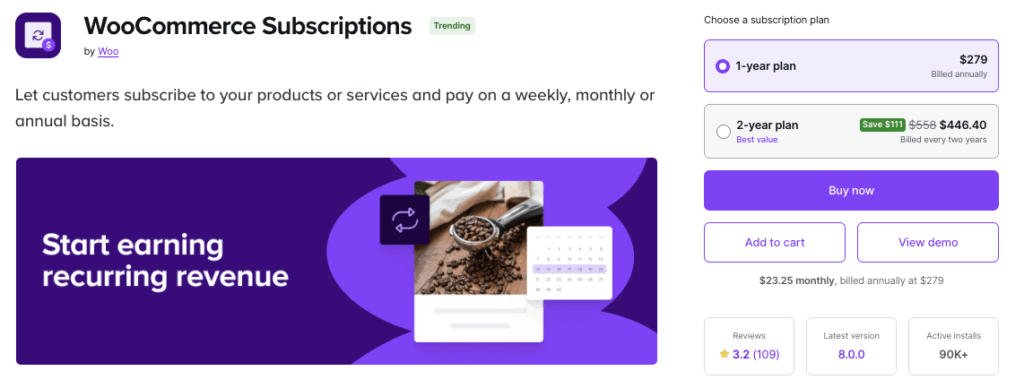
For example, the official WooCommerce Subscriptions extension costs $279 per year for a single-site license, which includes updates and support. This plugin enables recurring payments, subscription management, automatic renewal billing, and access to member-only content. While alternative free subscription plugins exist, they often have limited functionality compared to the official extension. Similarly, WooCommerce Bookings costs $249 per year for appointment scheduling and reservation management.
It’s also worth noting that WooCommerce continues to add more features to its free core plugin. Features like the brands functionality and cost-of-goods tracking are included in core WooCommerce. This “More in Core” initiative reduces plugin costs for new stores by incorporating commonly needed functionality at no additional charge.
Plugins like WooCommerce Social Login, WooCommerce Product Search, Cart Add-ons, Smart Coupons, etc., are examples of premium options. While starting prices for these extensions are often under $100, the costs can quickly add up depending on the number and type of extensions you choose.
Theme and design costs
There are free WooCommerce themes, like Storefront, which are great for businesses just starting out or with limited budgets. These themes provide basic functionality and aesthetics but may lack advanced features and customization options.
Premium WooCommerce themes can cost $50 to $200 for one-time purchases or annual licenses that include ongoing updates. Most premium themes require an annual license renewal to maintain continued support access, receive security patches, and receive feature updates.
Premium themes include advanced design options, WooCommerce-optimized layouts, and performance enhancements beyond free alternatives. Themes like Kadence or Astra Pro provide pre-built shop layouts, advanced customization panels, and dedicated support teams. An investment in a premium theme makes sense when you need a professional design without hiring a developer for extensive customization.
It’s important to distinguish these theme products from custom services. Premium theme purchases differ from the custom theme development services covered in the development costs section earlier. Custom theme development costs more for a completely unique design, while premium themes offer pre-built templates you can customize yourself.
Codeable offers expert assistance in theme selection and customization to make your WooCommerce store look great and function optimally to align with your business goals and customer expectations.
Configuration assistance
Professional WooCommerce configuration costs depend on setup complexity and customization requirements. For smaller tasks, developers charge $50 to $100 per hour for entry-level work and $100 to $200 hourly for specialized expertise. This configuration service includes installing plugins, integrating payment gateways, setting up shipping options, and ensuring theme compatibility. Platforms like Codeable provide transparent project estimates from pre-vetted developers with proven WooCommerce experience.
Hiring an expert for this prevents costly errors from incorrect configurations. Expert setup also ensures your store has a solid foundation for security, performance, and scalability right from launch, which reduces troubleshooting time later. Pre-vetted developers reduce costly project failures and ensure professional implementation standards.
Can you DIY WooCommerce?
This is a key question for every new store owner. WooCommerce stores can be built without professional developers, but only if your requirements stay within the standard platform capabilities. The DIY approach works well for simple stores, but professional development becomes necessary for custom features, complex integrations, or high-traffic performance optimization.
Here’s a framework to help you decide.
| You can DIY if you have: 10-50 products with standard variations.Comfort with the standard checkout process. A plan to use a pre-built theme with minimal customization. No complex shipping rules or tax calculations.Basic integration needs (like standard payment gateways only). 40-60 hours available for learning and setup. Estimated DIY costs: A DIY WooCommerce store typically costs $500 to $2,000 per year for hosting, a domain, a premium theme, and essential plugins. | You should hire a professional if you need: Custom features beyond standard WooCommerce capabilities. Third-party system integrations (like a CRM, ERP, or accounting software). Performance optimization for high traffic. Custom checkout workflows or unique pricing rules.Complex shipping logic or multi-location inventory. A quick launch timeline (under 30 days). Estimated professional costs: Professional WooCommerce development for a custom store costs $3,000 to $10,000 or more, depending on the customization scope. |
The middle ground: A hybrid approach
Many store owners handle the basic setup themselves, but hire experts for specific, complex technical tasks. This hybrid approach reduces overall costs while ensuring that complex features are built correctly. Codeable, for example, matches you with vetted developers for specific customizations, migrations, or troubleshooting without requiring a full-scale agency engagement. This targeted approach lets you maintain control while accessing expert help right when you need it.
Control your WooCommerce budget
Understanding the costs is the first step; managing them is the next. Smart WooCommerce budgeting phases investments across launch, growth, and optimization stages rather than maximizing spending upfront. This approach ensures essential elements receive an adequate budget while leaving flexibility for iterative improvements.
Phased investment approach
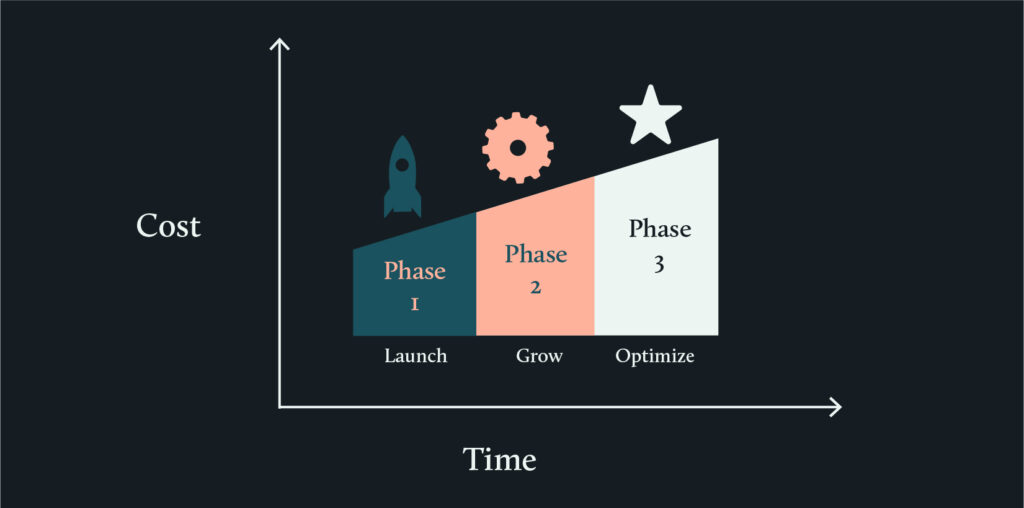
Here is a common framework for phasing your investments over time.
Phase 1 – Launch ($1,000–$1,500): Phase 1 launch investments cover hosting, your domain, an essential theme, basic development setup, and security fundamentals.
- Priorities: Reliable hosting, SSL certificate, professional setup, and payment gateway integration.
- Timeline: Initial 1-3 months.
Phase 2 – Growth ($1,500–$3,000): Phase 2 growth investments add marketing automation, analytics tools, and performance optimization as your sales increase.
- Priorities: Email marketing, SEO tools, conversion optimization, and basic maintenance.
- Timeline: Months 3-12.
Phase 3 – Optimization ($2,000–$10,000+): Phase 3 optimization investments fund custom features, advanced integrations, and scaling infrastructure as your business matures.
- Priorities: Custom development, API integrations, advanced analytics, and dedicated support.
- Timeline: Year 2+.
Where to invest vs. where to save
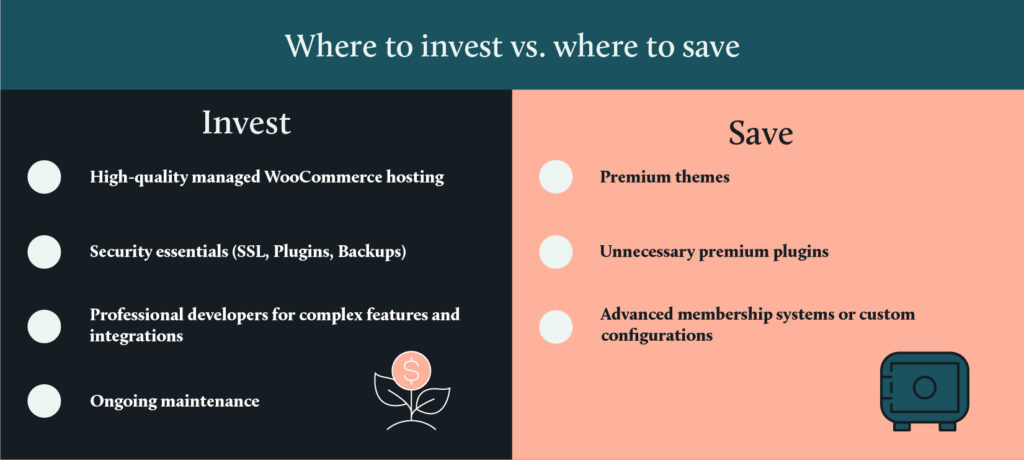
Not all costs are created equal. Here’s where to spend your money and where you can save.
Invest in these:
- Quality hosting: Invest in managed WooCommerce hosting over budget shared hosting to prevent performance issues and downtime.
- Security essentials: Invest in SSL certificates, security plugins, and regular backups as baseline protection for customer data.
- Professional development: Invest in professional developers for complex features or integrations to avoid costly technical debt.
- Maintenance: Invest in ongoing maintenance to prevent security breaches and compatibility issues that halt sales.
Save on these initially:
- Premium themes: Start with high-quality free themes before investing in premium designs once you’ve validated your product-market fit.
- Multiple plugins: Limit premium plugins to essential functionality initially. You can add features incrementally as customer needs become clear.
- Advanced features: Postpone advanced features, such as membership systems or custom configurators, until your core store functionality proves successful.
Budget pitfalls to avoid
Finally, watch out for these common budget-killers.
- Cheap developers creating technical debt: Underpaying developers often leads to poor code quality that requires expensive fixes later on.
- Too many plugins: Excessive plugins slow down your site’s performance and create compatibility conflicts that require developer troubleshooting.
- Neglected maintenance: Skipping updates and monitoring risks, security breaches, and unexpected downtime that cost far more than preventive maintenance.
- Scope creep: Adding new features mid-project without adjusting the budget causes cost overruns and delayed launches.
💡Smart Budgeting: Reserve 15-20% of your total budget for unexpected expenses, project adjustments, or urgent fixes during the first year.
Scaling up and targeting international markets: Costs and considerations
Expanding your WooCommerce store internationally adds specific costs. You must budget for:
- Currency and payment methods: Supporting multiple currencies and local payment methods often requires integrating new gateways, which have their own setup and transaction fees.
- Translation and localization: This requires an investment in translation services or plugins (like Weglot), plus localization efforts to adapt content for different cultural contexts.
- International shipping and logistics: Factor in higher shipping costs, customs duties, logistics provider fees, and the cost of managing cross-border returns.
- Tax and legal compliance: You must budget for varying tax laws. This may involve legal consultation or accounting tools, like WooCommerce Tax, to handle calculations accurately.
- Localized marketing: This includes funding for regional SEO and culturally relevant marketing campaigns.
- Customer support: Supporting multiple languages and time zones adds operational costs, potentially requiring new staff or outsourcing.
Codeable: Your cost-effective solution for your WooCommerce store
The pathway to launching a successful WooCommerce store involves numerous steps and considerations. From the beginning, understanding and managing your budget for essentials like hosting, domain registration, and security is vital. As your store matures, you’ll embrace the nuances of scaling up, diving into market research, and ensuring that every aspect of your store is localized for a global audience.
But one thing remains clear throughout this journey: the importance of professional assistance cannot be overstated.
Professional assistance for your WooCommerce store ensures that the platform is customized to your unique needs and guarantees that your store is optimized for performance, scalability, and customer satisfaction.
And, where better to find such expert assistance than Codeable? Codeable screens developers through technical exams and live coding tests before acceptance. Only developers with proven WordPress and WooCommerce expertise pass the rigorous vetting process. This pre-screening eliminates the time businesses spend evaluating developer technical capabilities themselves.
This network of over 650 vetted WooCommerce experts completes more than 2,000 projects monthly. Codeable is listed on the official WooCommerce Marketplace as a trusted partner for development services and is recommended by hosting providers like Kinsta for quality WordPress development.

Whether it’s bespoke plugin development, theme customization, or strategic maintenance and support, Codeable gives you the confidence that every penny spent is an investment toward quality, security, and growth. Whether you need basic store configuration or enterprise custom development, Codeable provides transparent project estimates. The platform also offers retainer services for ongoing development needs as an alternative to full-time hiring. You can browse vetted WooCommerce developers on Codeable’s developer directory to review expert portfolios and specializations.
By choosing Codeable, you’re building an online store and fostering a future-proof digital presence crafted by some of the most talented developers in the industry.
Build your WooCommerce store with Codeable
From the basic setup, including hosting and domain registration, to the more intricate costs associated with themes, plugins, and international expansion, understanding both development costs and platform expenses helps you budget realistically and make informed decisions.
Development costs represent your largest variable expense. Platform costs for hosting, themes, plugins, and security add recurring expenses ranging from hundreds to thousands annually. Phasing these investments strategically across launch, growth, and optimization stages maximizes your budget effectiveness.
While there are mandatory expenses like hosting and security, optional investments can elevate your store. Phase investments strategically from launch essentials through growth features to optimization capabilities. The cost of building an online store should never deter your ambition, especially when you have Codeable on your side.You don’t have to navigate these financial decisions alone.
Submit your project today for transparent cost estimates from vetted WooCommerce experts. Codeable’s matching process connects you with developers who are experienced with your specific requirements and budget range.

20 000+ businesses of every shape and size have already trusted us to hire WordPress developers and scale their growth.
 Dream It