



WordPress maintenance pricing ranges from $30 to $5,000+ per month. That spread is so wide it’s practically useless, because the word “maintenance” can mean anything from automated plugin updates with zero human oversight to a dedicated developer managing your entire site every single week.
WordPress powers nearly 43% of all websites globally, which means the maintenance market is massive, and pricing varies widely. Most pricing guides don’t help much either. They compile ranges from other pricing guides, leaving you with vague brackets like “$50–$75 for basic” and no way to verify what that actually buys.
This article takes a different approach. We’re going to break down what Codeable charges at each of its three maintenance tiers, starting at $140/month, with a full list of what’s included at every level. You’ll walk away with a task-by-task framework you can use to evaluate any maintenance quote, from any provider, and know exactly what you’re paying for.
What you should expect to pay for WordPress maintenance
WordPress maintenance pricing is the monthly cost of keeping a WordPress site updated, secure, and functional after the initial build. Most pricing guides pull ranges from other pricing guides.
We’re using Codeable’s published maintenance packages as the pricing framework here. These are prices and feature lists we control and can verify line by line. They also give you a concrete benchmark to hold any other provider’s quote up against.
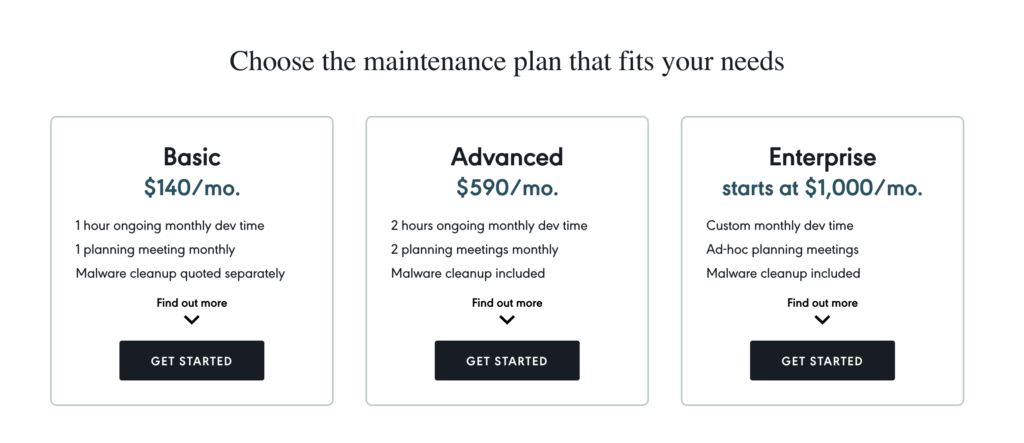
Basic: $140/month
This tier covers the foundation that every WordPress site needs:
- Plugin updates are tested on a staging environment before they touch your live site.
- Regression testing to catch anything that breaks before visitors do.
- Daily offsite cloud-based backups – full site and database snapshots, verified and tested.
- Scheduled malware and vulnerability deep-scans.
- 1 hour of dedicated development work per month for small tasks.
- One 15-minute monthly planning meeting to review previous work and plan the next dev hour.
Malware cleanup is quoted separately at this tier.
Advanced: $590/month
This includes everything in Basic, plus:
- Visual regression testing with automated tooling that runs after every major update to detect and flag unintended layout or design changes.
- 2 hours of dedicated dev time per month for website edits, content updates, bug fixes, or minor feature additions.
- Two structured 30-minute planning meetings per month to review performance, allocate dev time, and set priorities.
- Malware cleanup and full site restoration included at no extra cost.
Enterprise: starting at $1,000/month
This tier is built around your site’s specific needs:
- Plugin updates on staging with either end-to-end automated testing or regression testing, chosen based on your site’s architecture.
- A custom guaranteed block of dedicated dev hours each month, scoped to your workload.
- A custom meeting cadence defined by project complexity (weekly, bi-weekly, or otherwise).
- Automated testing of critical user flows like checkout and contact forms.
- Malware cleanup included.
- An annual strategic roadmap session, which includes a formal review of site performance and business goals, resulting in a 12-month improvement plan.
What cheaper plans actually deliver
Plans in the $30–$50/month range do exist elsewhere. They typically run automated updates with no staging environment, store backups weekly (often on the same server as the site), provide basic scanning with no human troubleshooting, and include zero development time. If an update breaks something, you’re either fixing it yourself or paying hourly.
The gap between $50/month and $140/month comes down to one thing: human involvement. Staging-tested updates, offsite backups, regression testing, and an actual developer who reviews your site every month.
The cost of skipping professional maintenance altogether is worth considering, too. Recovering from a hacked WordPress site typically runs $200–$2,000+, depending on severity, and the downtime itself can cost far more in lost revenue and damaged customer trust. Melapress’s 2025 survey found that 64% of WordPress professionals had experienced a breach, and most of those breaches happened on sites without a structured maintenance plan.
Where different site types fit
- Personal blogs and brochure sites can operate on a basic-tier plan. Staging-tested updates and daily backups cover the core risk for sites with standard themes and limited plugin use.
- Small business sites with integrations, such as CRM connections, member portals, and custom forms, typically require an advanced-tier maintenance plan. Custom functionality requires human testing and more dev time each month.
- WooCommerce stores start at the Advanced tier and frequently require Enterprise. Payment gateway monitoring, post-update checkout testing, and inventory sync integrations all represent real additional work. Codeable’s WooCommerce cost guide puts WooCommerce maintenance at $500–$3,000+/month depending on store complexity.
Patchstack’s 2025 mid-year report found 6,700 new WordPress vulnerabilities in just six months, with 41% of them exploitable in real-world attacks. This makes it clear that staging-tested updates and regular website maintenance matter far more than the price printed on any plan.
Factors that affect your maintenance costs
WordPress maintenance costs are shaped by four main variables: your plan tier, site complexity, plugin count, and engagement model. The monthly fee alone doesn’t capture the full picture, and several other factors will determine what you actually spend each year.
Costs that sit outside the monthly fee
Maintenance plans, including Codeable’s, typically don’t bundle hosting.
- Budget an additional $30–$100/month for managed WordPress hosting from providers like Kinsta or WP Engine.
- Premium plugin licenses add up, too. Tools like Gravity Forms, WP Rocket, and Yoast Premium can cost $200–$1,000/year, depending on how many you rely on.
- Domain registration runs $10–$20/year.
- SSL certificates are free via Let’s Encrypt on most managed hosts, so that’s one line item you can usually cross off.
FatLab’s pricing analysis found that a cheap maintenance-only plan plus separate hosting, a CDN, and even one quarterly emergency fix can add up to more per month than a single bundled plan that covers all of those things upfront.
Before you compare quotes, make sure you’re comparing total costs, not just the monthly sticker price.
Site complexity as a cost driver
The number of plugins on your site is the single biggest variable. Every plugin adds update risk and the potential for conflicts with other plugins or your theme. More plugins mean more to test and more to monitor.
Custom code raises costs further. API integrations, ERP connections, and member portals all require human testing that automated tools simply can’t replicate. This is typically what pushes a site from a Basic plan into an Advanced or Enterprise tier.
There’s also the breach question. As noted earlier, 64% of WordPress professionals surveyed by Melapress had experienced a breach. Check your provider’s tier breakdown carefully to know whether malware cleanup is included in your plan or billed as a separate emergency charge, as that can be a major cost differentiator.
How your engagement model affects pricing
Freelancers vs agencies: the type of partner you choose changes your cost structure in ways that go beyond the hourly rate.
Freelancers offer the most flexibility and the lowest upfront cost. The tradeoff is availability. If your freelancer is fully booked when your site goes down on a Saturday morning, you’re waiting until they’re free.
Experienced WordPress agencies bring team depth and consistent availability. But you’re often paying for the overheads of project managers, account coordinators, and office costs on top of the developer who’s actually doing the work.
Codeable sits between the two. You work with a single dedicated expert who’s been vetted through a process with a 2.2% acceptance rate. Package prices are published with no bidding, and a transparent 17.5% service fee covers expert vetting, platform management, and 24/7 customer support. You get the direct-access relationship of a freelancer with the quality assurance of an agency.
How to evaluate a WordPress maintenance quote
A WordPress maintenance quote is a proposal detailing the services, response times, and pricing a provider will deliver for your site. You now know what maintenance costs and what drives the price up or down. The next step is putting that knowledge to work when you’re actually comparing quotes. Here are the specific questions to ask before you sign anything.
Update methodology. Does the provider test updates on a staging environment with regression testing before pushing them live? Or do they run automated updates directly on your production site? If updates aren’t tested first, no one catches it when a plugin update breaks your checkout flow or contact form.
Backup specifics. Are backups daily and stored offsite, or weekly and kept on the same server as your site? If your server fails and your backups live on it, you effectively have no backups at all.
Malware response. Does the plan include malware cleanup, or just scanning? Some providers will detect malware and then charge $200+ to actually remove it.
Included dev hours and overage rates. How many development hours come with the plan, and what’s the hourly rate when you need more? Plans with zero included hours that charge premium rates for every small request add up quickly over a few months.
Hosting bundled or separate. If hosting isn’t included in the monthly fee, add your actual hosting cost to the quote before comparing it to other providers. (See the total-cost-of-ownership breakdown in the previous section.)
Response time and planning. Is there a defined meeting cadence and a response time commitment? Or is the support model closer to “we’ll get to it when we can”?
Red flags to watch for. Be cautious with quotes that don’t specify how updates are tested, include no maintenance checklists or development hours at all, or make no mention of hosting and premium plugin costs anywhere in the proposal.
💡Pro tip: For a side-by-side look at maintenance providers, read our guide on how to choose the right WordPress maintenance service.
Getting the right maintenance plan for your site
You now have a full pricing framework and a checklist to vet any quote. If you want a provider that checks every box we’ve covered, Codeable’s maintenance packages are built around exactly these standards.
All three tiers – $140/month (Basic), $590/month (Advanced), and $1,000+/month (Enterprise) – include staging-tested updates with regression testing, daily offsite backups, scheduled security scans, included dev hours, and structured planning meetings.
Every plan pairs you with a dedicated Codeable expert. That’s the same vetted developer who learns your site’s architecture, custom code, and business context month after month. No rotating support agents. No starting from scratch on every ticket.
There are no long-term commitments, either. You can adjust your support level as your site and business grow.
When you’re ready to get started, explore Codeable’s maintenance packages and find the right plan for your site today.
Frequently asked questions about WordPress maintenance pricing
What are the typical hourly rates for WordPress developers for ad-hoc fixes?
Hourly rates for WordPress development vary by experience level and engagement model. Freelancers typically charge $50–$150/hour, while agencies often bill $100–$250/hour. Codeable’s recommended hourly rate for project-based work falls between $80–$120 USD, with a 17.5% service fee included in the final price. Keep in mind that plans with zero included dev hours will push you into these hourly rates for every small request, which is why included dev time (even just 1–2 hours/month) can save you money over time.
How much does it cost to maintain a WordPress site myself versus hiring a professional?
DIY infrastructure costs are low; see the cost breakdown earlier in this article for exact figures on hosting, domains, and SSL. The real expense is your time: running updates, monitoring security, managing backups, and troubleshooting anything that breaks.
But the bigger concern is risk. Most WordPress vulnerabilities originate in plugins, and without staging-tested updates, a single bad update can take your site offline with no safety net and no recovery plan. Professional maintenance ($140–$1,000+/month) adds human oversight and tested updates, which is why most revenue-generating sites eventually move away from the DIY approach.
Is SEO or content marketing included in WordPress maintenance plans?
Typically, no. Standard WordPress maintenance covers the technical health of your site, including updates, backups, security, and site performance. SEO and content marketing are separate services with their own pricing structures. Some agencies bundle them into broader retainers, but if a maintenance quote includes SEO audits or management, make sure the line items are broken out so you can evaluate each service on its own merits.
What does it cost annually to manage WordPress infrastructure like domains and SSL on my own?
See our breakdown of costs outside the monthly fee above. In short: domain registration runs $10–$20/year, SSL is free on most managed hosts, and hosting adds $360–$1,200/year. Budget $370–$1,220/year before any maintenance labor.

20 000+ businesses of every shape and size have already trusted us to hire WordPress developers and scale their growth.
 Dream It