



User experience (UX) is how a person interacts with and feels about a website, app, or product. In practice, UX design means shaping every touchpoint so that visitors find your site easy, enjoyable, and worth coming back to.
For any WordPress site, strong UX is directly tied to business results. A well-designed experience builds trust, encourages repeat visits, and turns casual browsers into paying customers.
In this article, we’ll clear up common misconceptions about UX and walk you through the most effective ways to improve UX on your WordPress site.
What is the difference between User Experience (UX) and User Interface (UI)?
UX and UI are related but different. Understanding the distinction helps you hire the right people and set the right priorities for your WordPress project.
UX design covers the entire journey a person takes through your website or product. Its goal is to improve satisfaction and loyalty by making that journey useful, easy, and enjoyable. A study published in the Oxford University Press journal Interacting with Computers frames it this way: good UX comes from the utility, ease of use, and pleasure a person feels during an interaction.
Don Norman and Jakob Nielsen of Nielsen Norman Group take this further. They describe UX as touching every aspect of a user’s end-to-end experience. That means responsibility for UX is shared across many roles — front-end and back-end developers, copywriters, product strategists, data analysts, and marketers all play a part. UX design is not the sole creation of any single “UX designer.”
User interface (UI) design is a subset of UX. It focuses on the visual and interactive elements a person sees and touches: screens, colors, typography, buttons, and animations. For example, infinite scrolling is one UI pattern for browsing content on a page. But you might swap it for pagination, a “load more” button, or sub-category filtering if testing shows that a different pattern leads to a better experience.
In practice, UX design comes first. It involves planning the full experience — mapping user flows, improving site speed, and fixing bugs that frustrate visitors. UI design follows, turning those plans into polished visuals and interactive features.
Many UX/UI designers have skills that cross over, but the two disciplines are not the same. A quick way to tell them apart: UX relates to site functionality and purpose, while UI relates to site look and feel.
Why is UX important for WordPress sites?
WordPress makes it relatively easy to launch a website. Site editors, plugins, themes, and analytics tools can get you up and running fast. But knowing how to use these tools is not the same as knowing how to create a great experience with them.
You can set up a WooCommerce store in a weekend. Planning a meaningful, enjoyable journey — from the moment someone lands on your homepage to the moment they complete checkout — takes a very different skill set. WordPress UX design requires both proficiency and hands-on experience.
Professional UX designers still choose WordPress for client projects, and for good reason. The platform powers over 43% of the web, which means designers can draw on a massive ecosystem of themes, page builders, and plugins to prototype and ship client work quickly. WordPress also gives UX professionals full control over layout, navigation, and interaction patterns through tools like the Full Site Editor and custom block development. For client projects that need to scale, like an e-commerce store today, a membership portal next quarter, WordPress offers the flexibility to grow without starting over on a new platform.
This combination of speed, flexibility, and a mature plugin ecosystem is why agencies, freelance designers, and in-house UX teams continue to rely on WordPress as their go-to CMS for client-facing work.
Top ways to improve your WordPress UX
Several key factors shape how people experience a website. Here are the most effective ways to improve UX on your WordPress site.
Know Your Audience
Plan your WordPress UX design with specific users in mind. User personas help you connect needs, desires, and motivations to real behaviors on your site.
From there, assess actual user behavior to judge how well your pages perform. Focus on high-impact pages like your homepage, landing pages, and key product pages. You want to know what visitors are trying to accomplish — and whether the path to that goal is smooth or full of friction. These insights reveal what needs fixing and where you can lift conversions.
A range of tools can help you visualize this data through heatmaps and graphs:
- Google Analytics tracks how visitors move around your site. It lets you monitor clicks on links, CTA buttons, navigation menus, and other interactive elements.
- Hotjar provides heatmaps that show how visitors scroll, click, and navigate on both desktop and mobile. It also offers session recordings so you can watch real user journeys.
Responsive Design
Responsive design is the practice of building a website that adapts its layout to fit any screen size. It is one of the most important aspects of good WordPress UX.
A responsive site retains its visual appeal on both large monitors and small phone screens. Layouts resize automatically. Images scale to fit. Font sizes and navigation menus adjust so the site looks and feels right regardless of the device.
This goes hand-in-hand with accessibility. Following the WCAG 2.2 guidelines, the current web accessibility standard, makes sure your site works well for people with disabilities, including those using screen readers or keyboard-only navigation. Meeting these standards also protects your business from legal risk and widens your potential audience.
Content Design
Content design is the practice of making website content usable, accessible, and readable. It covers what you write, how you present it visually, and how users interact with it.
The UX side of content design means keeping a consistent look and feel across all pages. Text, images, banners, and buttons should follow the same visual patterns so visitors always know where to look and what to do.
Content designers also decide how specific information should be presented based on its importance. A product benefit might work best as a short video with a slogan. A pricing comparison might call for a calculator tool. The goal is to match the format to the message so that high-value content stands out and is easy to take in at a glance.
Site Speed
Site speed is a direct UX factor. Slow pages frustrate visitors, hurt search rankings, and cost you sales.
Design choices play a big role here. Fast-loading images, smart pagination, and lightweight plugins all contribute to quicker page loads. On the flip side, obscure custom fonts and too many social media buttons can drag down performance.
For pages with a large amount of content, UX patterns like accordion sections (often styled as “Read more” buttons) or collapsible sidebar filters help reduce what needs to load up front. These patterns let visitors expand only the content they care about.
The data backs this up: when page load time increases from 1 second to 3 seconds, the probability of a user bouncing rises by 32%.
Beyond design, regular site maintenance matters just as much for sustaining good performance over time. Tasks like database cleanup, plugin updates, and server-side caching prevent gradual slowdowns. If speed is a priority for your site, Codeable offers several dedicated maintenance plans to keep your performance on track without requiring constant attention.
Customer Support
You can use UX design to improve how your site handles customer support. A live chat box, for example, lets visitors get answers to questions in real time. A self-service area gives customers access to order details, invoices, or account settings on their own.
Good support UX is about guiding people through each step of their journey. If your site requires customers to upload documents, a status indicator can reassure them that the upload is in progress. If you run an e-commerce store, a progress bar during checkout shows customers exactly where they are in the process. Small touches like these reduce anxiety and build trust.
Five types of plugins to enhance your WordPress UX
WordPress plugins let you add features and functionality to your site without writing code. They are one of the fastest ways to improve UX. A smart starting point is to install plugins that reveal how visitors interact with your site, then use those insights to plan targeted UX improvements.
Hundreds of UX-focused plugins are available. Here are five categories worth exploring.
Caching Plugins
For all WordPress sites that want to speed up load times.
A caching plugin stores copies of your pages so they load faster on repeat visits. Many hosting providers include basic caching out of the box, but a dedicated plugin can push performance further. A good caching plugin will optimize caching for mobile as well as desktop. For example, it can generate a separate cache for mobile devices alongside the standard desktop cache.
We recommend WP Fastest Cache. It reduces server requests by caching pages, which cuts load times and lightens the demand on your server. The premium version adds database cleanup, lazy loading, image optimization, and widget caching.

Alternative products in this category:
WordPress Form Plugins
For all WordPress sites that want to use contact forms to collect leads and information.
Forms serve many purposes on a WordPress site. You can use them to grow your mailing list, enable user registrations, accept payments or donations, collect file uploads, or answer customer questions. Well-designed forms make it easy for visitors to take action and convert.
Good forms should look clean and behave intelligently. Conditional logic lets you show or hide fields based on a user’s responses. For example, you can keep the “Submit” button hidden until a visitor checks the “Terms and Conditions” box.
Ninja Forms is a solid pick for building lead generation and customer support forms. It supports conditional logic fields for creating adaptive forms. You can also export submissions to Excel, PDF, or Google Sheets, or use query strings to auto-populate form data.
Alternative products in this category:
Analytics Plugins
For all WordPress sites, especially WooCommerce stores, that want to understand user behavior and use data to improve UX.
Making meaningful UX changes is difficult without accurate data about who your visitors are and what they do on your site. Analytics plugins fill this gap. Some connect to your Google Analytics account for centralized reporting. Others track user actions directly on your site through heatmaps and session recordings.
Our top pick is Hotjar. Hotjar generates heatmaps that show where users scroll and click. Its session recordings capture mouse movements and repeated tapping, which often signals frustration with speed or a confusing layout. You can also add on-site suggestion boxes or send targeted surveys to gather direct feedback from visitors.
Alternative products in this category:
Site Maintenance Plugins
For all WordPress sites that want to keep their site functional and catch issues before they disrupt UX.
WordPress sites and WooCommerce stores need regular upkeep. Things break; plugins conflict, links rot, databases bloat. Maintenance plugins help you spot these issues early so you can fix them before visitors notice. They can also back up your site or put it into maintenance mode to let users know why access is temporarily limited.
Broken Link Checker is a useful starting point. It monitors all internal and external links on your site. When it finds a broken link, missing image, or faulty redirect, it notifies you on the dashboard or via email. You can edit problematic links directly from the plugin’s interface, which saves time.
Alternative products in this category:
WooCommerce Search Plugins
For WooCommerce stores that want to give shoppers a faster, more accurate product search experience.
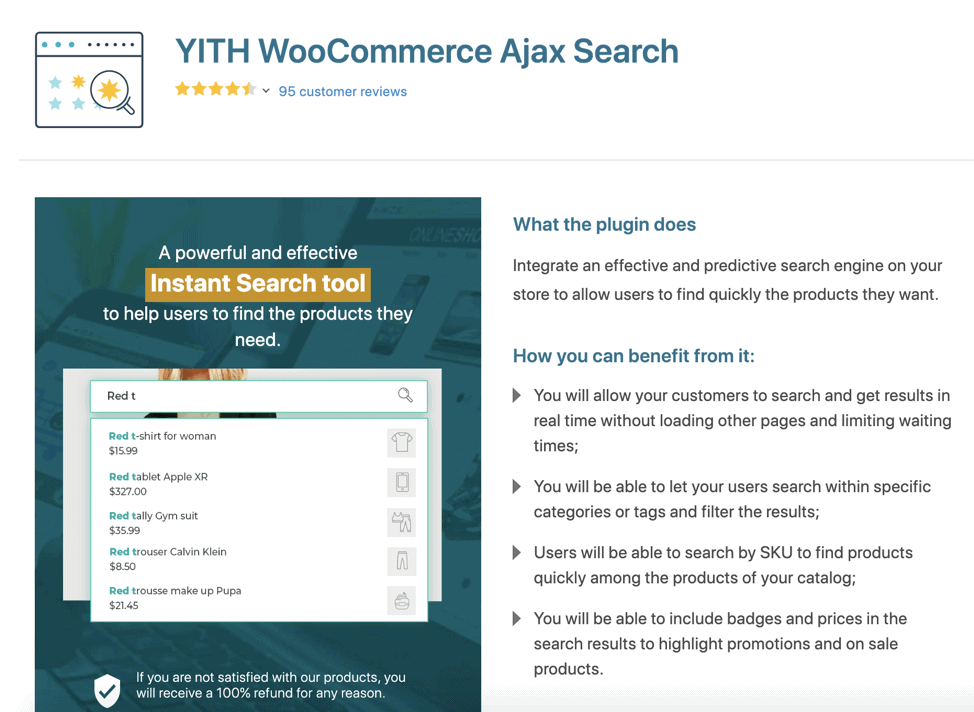
Our pick in this category is YITH WooCommerce Ajax Search. This plugin lets users search for products without reloading the page. Results appear instantly as shoppers type, which reduces wait time and makes browsing feel more responsive.
Shoppers can narrow results by category or tag and filter from there. If you operate in the B2B space, carry a large catalog, or offer many product variations, SKU-based search is a particularly useful feature. It lets returning customers find and re-order specific items quickly.
Alternative products in this category:
Disclaimer: Codeable is not affiliated with any of the plugins recommended in this article.
Why plugins are not your only solution
Plugins are a quick and accessible way to improve your WordPress UX. Install one, configure it, and the functionality is live. But relying too heavily on plugins can introduce problems that end up hurting the very experience you’re trying to improve.
Here are the main limitations to keep in mind:
- Performance impact. Some plugins slow down your site by making too many HTTP requests and database queries. The more plugins you stack, the greater the risk to page speed.
- Feature mismatch. You may not find a plugin that does exactly what your UX requires. Many come loaded with extra features you’ll never use, which adds unnecessary code to your site.
- Security exposure. 52% of WordPress vulnerabilities originate from plugins. Every plugin you install needs regular updates and monitoring to keep your site secure.
- Limited flexibility. If your WordPress site is custom-built or your product or business model has unique requirements, a generic plugin may not be adaptable enough.
The better solution? Work with a WordPress Developer using Codeable
Plugins can take you a long way, but there are times when you need a human expert. If your UX goals go beyond what any off-the-shelf plugin can deliver, a WordPress developer with hands-on UX experience is the right next step. They can build solutions that are tightly aligned to your specific business needs and user journey.
Codeable connects you with experienced WordPress UX developers who can handle a wide range of projects, including:
- Custom theme work. Build a new WordPress theme from scratch or customize your existing theme to better serve your users.
- Plugin development. Create or customize plugins to deliver exact UX functionality that off-the-shelf options can’t match.
- Ongoing site maintenance. Keep loading speeds fast and security tight through regular maintenance packages that cover updates, backups, and performance tuning.
- UX and performance audits. Get a professional assessment of your site’s usability, speed, and code quality — then receive a clear action plan for what to fix first.
- Bug fixes. Resolve issues that are hurting the user experience, from broken layouts to checkout errors.
- Strategic UX consultation. Work with a developer to plan your site’s UX roadmap before writing a single line of code. Consultation packages are a good fit if you need expert guidance on architecture, user flows, or feature prioritization.
Codeable’s developers have extensive experience in WordPress. Whether you run a business site, an affiliate marketing blog, or a WooCommerce store, the platform’s developers apply proven UX best practices to make your site easier and more enjoyable to use.
Every expert on Codeable goes through a rigorous vetting process. Developers also choose which projects they take on, so the person matched to your project is genuinely confident they can deliver strong results. This means you’re working with someone who is motivated and well-suited to your specific challenge.
Once you submit your project, you’re matched with 1 to 5 developers and can decide who to work with from there. Being specific in your brief will help you get faster, better matches as clear requests make developer-project matching quicker and more accurate.
Make sales-boosting changes to your WordPress UX
A well-designed user experience drives more conversions and keeps customers coming back. Plugins can handle part of the job, but if you want a site that’s built around your specific users and goals, working with a Codeable developer gives you that level of control.
Good UX design starts with understanding what your users need and how they behave. Codeable’s professionals bring that expertise, applying UX best practices to make your site more intuitive and enjoyable to use.
Cost-wise, working with a developer through Codeable can be more economical than stacking premium plugins and spending time maintaining them. And if the project doesn’t meet your expectations, you get your money back.
Submit your project to start improving your site’s UX, or simply to explore how our custom packages work. You don’t have to commit to hiring if you need more time for usability testing or want to think things over first.
 Dream It